
Learn how to create and manage registrations for your business and your affiliates.
My Registrations
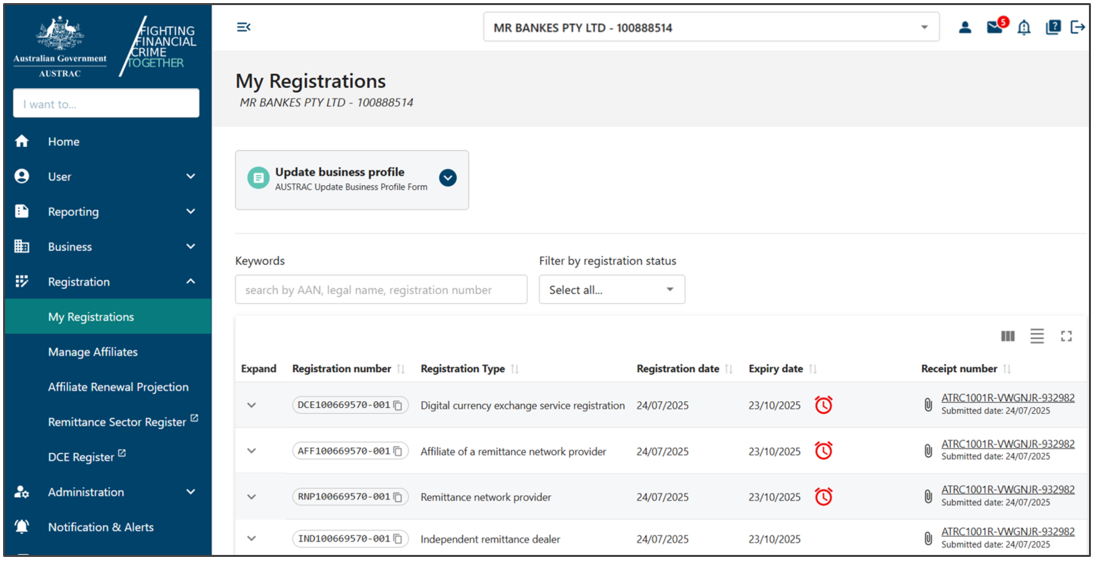
All current and previously submitted registrations for your business will show in My Registrations.
To view this:
- Select Registration in the left-hand menu.
- Select My Registrations.
We’ll send reminder email messages before the registration expires for all:
- virtual asset service providers (VASPs)
- independent remittance dealers
- remittance network providers.
You’ll get reminders 90 days, 60 days and 30 days before expiry, and on the final day. You should renew your registration as soon as possible after you get the 90-day notification.
- Select the drop-down arrow next to a registration to view more details. If the expiry date is within the next 90 days, you’ll see the renew symbol (alarm clock) in the ‘Expiry date’ column.
- Expand the Renew remitter registration box.
- Select Renew remitter registration.

- Select Confirm.

- Complete the form and consider all the questions and statements to make sure you’re making an accurate declaration on the form.
- Select Submit on the last page.
While we consider your renewal request, you can find the renewal request receipt in the ‘Submissions’ tab in ‘Business Profile’.
Registered remittance providers and VASPs can continue to operate after they submit the renewal form until we make a decision about the renewal. This includes past the date of expiry.
We’ll respond in writing with the renewal decision. The new expiry date will appear if your renewal is successful.
Not renewing registration before the expiry date
If you don’t submit a renewal request by the expiry date, your registration will expire. It’s not possible to extend or change the expiry date. Your business must stop operating as a remittance services provider or VASP immediately after your registration expires.
If you want to restart providing a remittance or a virtual asset service, you must apply for a new registration. You can't operate during this period as you won’t hold a valid registration.
Manage affiliates
The Manage Affiliates menu allows remittance network provider (RNP) users to create and maintain a network of registered affiliates. As an RNP user, you can:
- submit applications for new affiliates
- manage the registration details of your existing affiliates
- renew existing registrations
- when required, remove affiliates from your network.
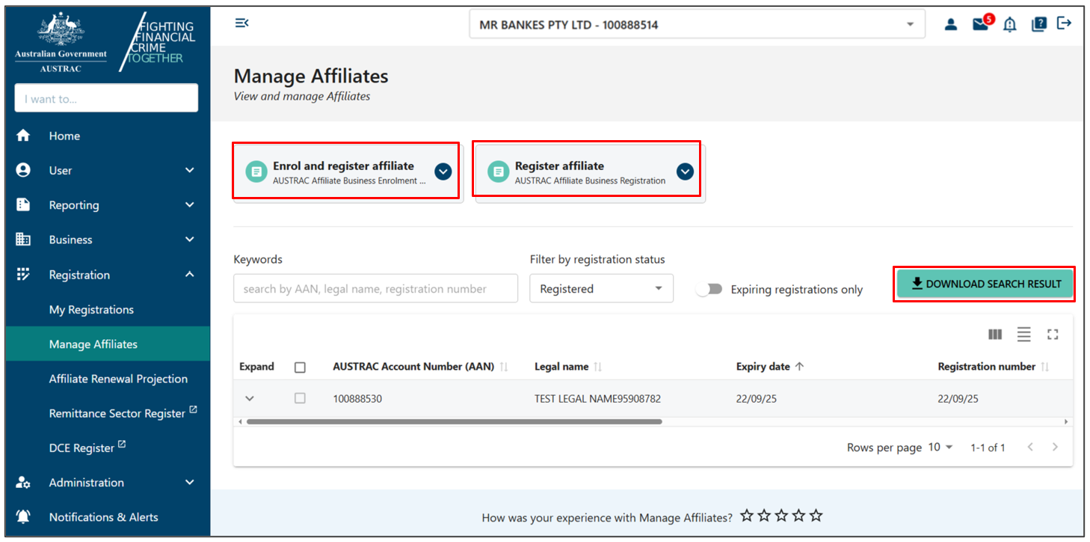
The Manage Affiliates page shows an overview of your current network of affiliates and all previous affiliates and applications. In addition, it provides a link to enrol and/or register a new affiliate. You can either:
- enrol and/or register a new organisation as an affiliate of your network
- register an organisation as an affiliate with existing enrolment with us. On the right-hand side above the table, Download Search Result lets you download the full list of affiliate registrations.
Enrolling and registering affiliates
You can choose to:
- Enrol an affiliate (for new affiliates not already on the Reporting Entities Roll), which will launch a digital ‘Enrol a new affiliate’ form to complete.
- Register affiliate (for affiliates already on the Reporting Entities Roll) – as an RNP, you must contact AUSTRAC to obtain the relevant registration form.
- Complete the relevant form and submit.
Remittance Network Provider – Renewals for affiliates
Affiliate registrations expire 3 years after the date of registration. We’ll provide access for you to request renewal of an affiliate registration 90 days prior to the expiry date.
Affiliate Renewal Projection
To view Affiliate Renewal Projection:
- Expand the Registration menu.
- Select Affiliate Renewal Projection to view the projected renewals of your affiliates.
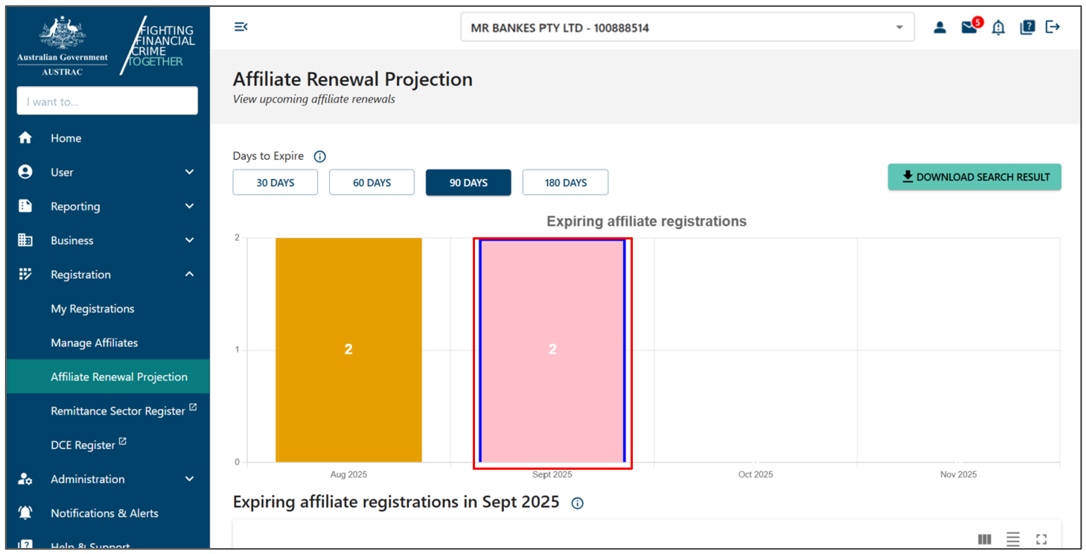
When the graph is displayed, it will default to show the details of the affiliates that expire within the next 90 days. The details of the affiliate registrations within this period will appear in a table below the graph.
The graph groups the number of expiries that occur in each calendar month. Registration can expire on any day of the month.
When you select a bar in the graph it displays the affiliate with expiring registration in the table below the graph.
The table is presented in expiry date order. The shortest renewal period is at the top of the list.
You may expand an affiliate registration record in the table to view the available options, which include:
- updating the affiliate enrolment
- removing the affiliate registration
- renewing the affiliate registration
- removing the affiliate registration from the RE roll – note: a request for us to remove the affiliate from the Reporting Entities Roll will also terminate the affiliate’s registration.
The affiliate registrations will remain on the screen while we’re processing any form. Once the form is processed, the registration will be updated accordingly – for example, removed or will move to the renewals period.
You can't renew or edit an affiliate registration that has been removed.
Remittance Sector Registration
We maintain and publish a list of registered remittance service providers. You can find out if a particular remittance service provider is registered by searching the Remittance Sector Register.
Search the Remittance Sector Register
To search the Remittance Sector Register:
- Expand the Registration menu.
- Select Remittance Sector Register.
- To search by legal name or trading name, enter at least 3 characters into the search box. The more characters you enter, the more accurate your search is likely to be. Search results are limited to 200 records.
- To search by ACN, ABN or ARBN, enter the full number without spaces into the search box.
- Select Search or press Enter.
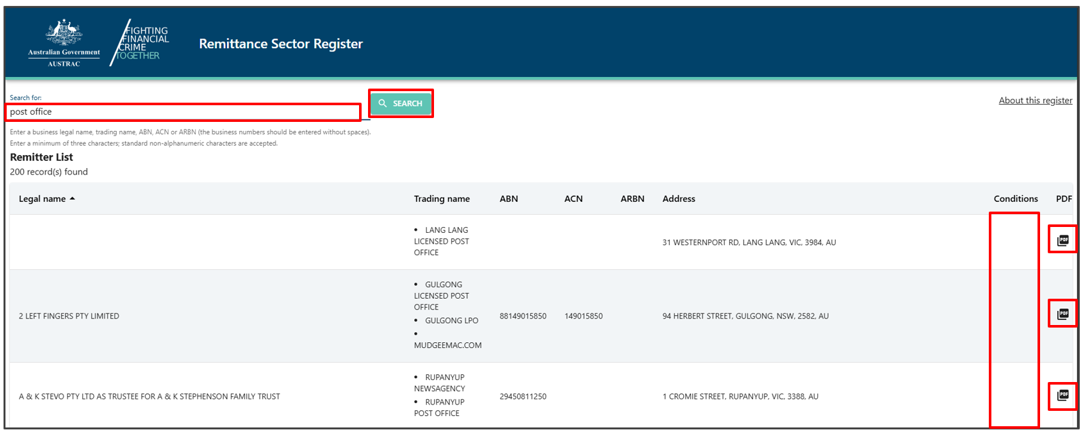
If we’ve applied conditions to a registration, an icon will be displayed in the ‘Conditions’ column. The icon isn’t a link and cannot be expanded in this screen.
At the end of each row, you can select the PDF icon to view a PDF version of the data available on the search screen. If the registration has conditions, the PDF will include the text of the conditions.
Virtual asset service provider (VASP) register
We maintain and publish a list of registered virtual asset service providers (VASPs).
You can find out if a VASP is registered by searching the VASP register.
Search the VASP register
To search the VASP register:
- Expand the Registration menu.
- Select VASP Register.
- To search by legal name or trading name, enter at least 3 characters into the search box. The more characters you enter, the more accurate your search is likely to be. Search results are limited to 200 records.
- To search by ACN, ABN or ARBN, enter the full number without spaces into the search box.
- Select Search or press Enter.

If we’ve applied conditions to a registration, an icon will be displayed in the ‘Conditions’ column. The icon isn’t a link and cannot be expanded in this screen.
At the end of each row, you can select the PDF icon to view a PDF version of the data available on the search screen. If the registration has conditions, the PDF will include the text of the conditions.
The information in the Remittance Sector Register and Virtual Asset Service Provider Register is based on information that’s been submitted to us pursuant to Part 6A Division 3 of the Anti-Money Laundering and Counter-Terrorism Financing Act 2006.
We don’t attest to the accuracy of the information contained in the registers and published on this webpage, other than to the extent it states that an entity's inclusion on the registers is subject to conditions and the details of any conditions imposed and the entity's registration number.
We make every effort to make sure the information entered on the Remittance Sector Register and Virtual Asset Service Provider Register and published via this webpage is up to date. However, there may be a delay between when we’re notified of new or amended information for the register and the publishing of that information.
This guidance sets out how we interpret certain Australian legislation, along with associated Rules and regulations. Australian courts are ultimately responsible for interpreting these laws and determining if any provisions of these laws are contravened.
The examples and scenarios in this guidance are meant to help explain our interpretation of these laws. They’re not exhaustive or meant to cover every possible scenario.
This guidance provides general information and isn't a substitute for legal advice. This guidance avoids legal language wherever possible and it might include generalisations about the application of the law. Some provisions of the law referred to have exceptions or important qualifications. In most cases your particular circumstances must be taken into account when determining how the law applies to you.